TikTok Reverse Video Search: Find Original TikTok Videos, Creators, and Reposts
TikTok videos spread very fast. A short clip can be downloaded, reposted, cropped, mirrored, shared without a watermark, or uploaded again on Instagram Reels, YouTube Shorts, Reddit, Facebook, Pinterest, and X/Twitter. Because of this, many users struggle to find the original TikTok video, the real creator, or the full version of a viral clip.
That is where TikTok reverse video search helps. Instead of guessing keywords or scrolling endlessly through TikTok, reverse video search lets you search by video, screenshot, keyframe, or video URL. It can help you find TikTok video sources, reposts, duplicate clips, and possible original uploads across the web.
In this guide, you will learn how to reverse search a TikTok video, how to find the original TikTok creator, how to choose the best screenshot or keyframe, and why some TikTok videos are difficult to trace.
What Is TikTok Reverse Video Search?
TikTok reverse video search is a way to search for a TikTok video using the video itself instead of typing a normal search query. A reverse video search tool analyzes the visual content of a TikTok clip and looks for matching or similar results online.
It can help you:
- Find the original TikTok video
- Find the original creator of a TikTok
- Search a TikTok video without a watermark
- Find reposted TikTok videos on other platforms
- Find the full version of a short clip
- Check if a viral TikTok is old, edited, or taken out of context
- Track stolen or reused creator content
This is useful because captions, hashtags, usernames, and watermarks are often removed when TikTok videos are reposted. Reverse video search focuses on the visual details inside the clip, such as faces, objects, signs, landmarks, backgrounds, logos, and keyframes.
Why People Reverse Search TikTok Videos
Users search for TikTok videos for different reasons. Some want to verify a viral clip, while others want to find the real creator behind a repost.
Common reasons include:
- You found a TikTok repost and want the original source.
- You have a saved video but the watermark is missing.
- You saw a TikTok clip on Instagram Reels or YouTube Shorts and want to know if it came from TikTok.
- Someone reposted your TikTok without credit.
- You want to find the full video from a short clip.
- You want to check whether a viral video is real, old, or misleading.
For creators, TikTok reverse video search is also useful for content protection. It can help locate duplicate uploads, stolen videos, and reposts that do not mention the original creator.
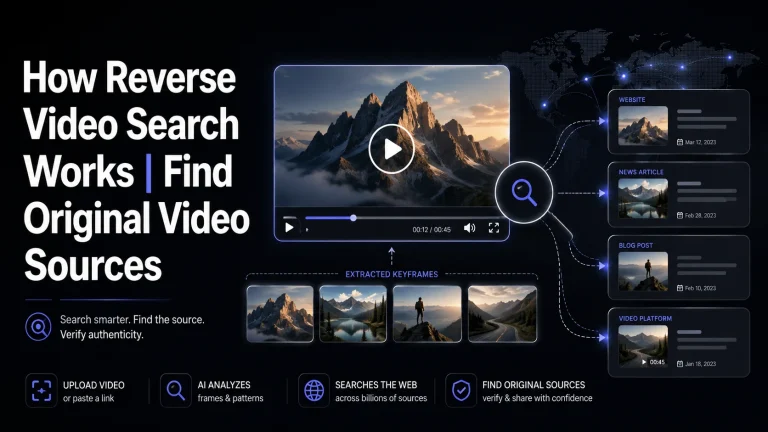
How TikTok Reverse Video Search Works
TikTok reverse video search works by analyzing the visual parts of a video. The tool does not depend only on captions or hashtags. Instead, it breaks the video into frames and selects clear images called keyframes.
Here is the simple process:
This method is helpful because a TikTok video may have a different title, caption, username, or watermark when it is reposted. But the visual content may still match.
Common TikTok Search Situations
Before you start, it helps to know what type of problem you are solving.
1. You Have a TikTok and Want to Find Reposts
If you already have the TikTok video, reverse search can help you check whether it was reused on Instagram Reels, YouTube Shorts, Facebook, Reddit, Pinterest, or X/Twitter.
2. You Have a Clip and Want to Know If It Came from TikTok
Sometimes you see a short video outside TikTok and want to know if TikTok was the original source. In this case, upload the clip or use a clear screenshot to search for matching TikTok pages or creator profiles.
3. You Have a TikTok Without a Watermark
If the watermark is removed, search using a keyframe from the video. Look for matching thumbnails, reposts with captions, usernames in comments, or older uploads.
4. You Want the Full Version of a TikTok Clip
If you only have a short part of the video, reverse video search may help find longer versions, original uploads, or reposts that include more context.
Best Ways to Reverse Search a TikTok Video
Different methods work better in different situations.
| Method | Best For | How It Helps |
|---|---|---|
| Paste TikTok URL | Public TikTok videos | Fast way to check source and matches |
| Upload saved video | Videos without links | Helps extract frames from the actual clip |
| Use screenshots | Manual searching | Works with Google Lens or image search |
| Search keyframes | Edited or reposted clips | Finds matches from important scenes |
| Use TikTok keywords | Captions, sounds, hashtags | Helps when visual search is not enough |
| Use DeepSearch | Cropped, mirrored, or reposted videos | Better for difficult source discovery |
For best results, try more than one method. A TikTok URL may fail if the video is deleted or private, but an uploaded file or strong screenshot may still show related reposts.
How to Choose the Best Screenshot or Keyframe
Choosing the right frame is very important. A bad screenshot can give weak or unrelated results.
| Good Screenshot | Bad Screenshot |
|---|---|
| Clear face, object, logo, or landmark | Blurry movement |
| Unique background or street sign | Plain wall or dark screen |
| Full scene visible | Covered by text or captions |
| Product, building, vehicle, or sign | TikTok UI buttons only |
| Sharp and bright frame | Low-quality screen recording |
Avoid using the first second of the video if it only shows a black screen, intro text, or app interface. Instead, choose a frame where the main scene is visible.
How to Find the Original TikTok Creator
Finding the original creator can take more than one search. Start by checking the video watermark, username, caption, hashtags, and comments. If those are missing, use reverse video search with a clear keyframe.
Look for:
- Older upload dates
- Matching TikTok thumbnails
- Creator usernames in repost captions
- Comments mentioning the original creator
- Reposts that include credit
- The most complete version of the clip
- Matching visuals on TikTok and other platforms
If several results appear, do not trust the first one immediately. Compare upload dates, video length, quality, and creator details.
How to Find TikTok Reposts on Other Platforms
TikTok videos are often reposted on other platforms. A reverse search TikTok video method can help you find where the same clip appears outside TikTok.
Check platforms like:
This is useful if you are trying to track stolen content, verify a viral clip, or find the earliest version of a video.
Why TikTok Reverse Search May Not Work
Sometimes TikTok reverse video search may not find the result you want. This usually happens because the video is not publicly indexed or the frame is not strong enough.
| Problem | Why It Happens | What to Try |
|---|---|---|
| No results | Video is private, deleted, or not indexed | Try another frame |
| Wrong results | Screenshot is too generic | Use a clearer scene |
| Missing creator | Watermark was removed | Check repost captions and comments |
| Too many matches | Clip is a common meme or trend | Search a unique moment |
| Poor accuracy | Video is blurry or compressed | Upload a better quality file |
| Edited clip | Video was cropped, mirrored, or re-captioned | Try DeepSearch |
TikTok videos can also be difficult to trace if they are very new, posted from private accounts, or shared only inside closed groups.
Is TikTok Reverse Video Search Safe?
TikTok reverse video search is generally safe when used for public videos, creator content, research, source discovery, and repost checking. However, you should avoid uploading private, personal, confidential, or sensitive videos unless you have permission to use them.
For safer searching:
- Use public TikTok clips
- Avoid private videos
- Do not upload personal content without consent
- Respect creator rights
- Use results for verification, research, or content protection
- Compare sources before making claims
A trustworthy reverse video search tool should be clear about what it can and cannot find.
Final Tips for Better Results
To get better TikTok reverse video search results, use the clearest video file or screenshot available. Try multiple frames instead of relying on only one image. Search for unique details such as faces, signs, logos, backgrounds, products, or landmarks.
If you want to find the original TikTok creator, compare upload dates and look for the most complete version of the video. If you want to find reposts, check other platforms where TikTok clips are commonly reused.
TikTok videos move quickly across the internet, but reverse video search gives you a smarter way to trace where a clip came from and where else it appears online.
Conclusion
TikTok reverse video search helps users find original TikTok videos, creators, reposts, duplicate clips, and full versions by searching with visual content instead of guessing keywords. It works by analyzing screenshots, keyframes, thumbnails, and video frames to find similar matches across the web.
Whether you are a creator protecting your content, a researcher checking a viral video, or a regular user trying to find the source of a clip, reverse video search can save time and give you better source clues. For the best results, use clear keyframes, compare multiple sources, and check upload dates carefully.
FAQs
Can I find a TikTok video without the watermark?
Yes, sometimes. Use a clear screenshot or keyframe from the video and search for matching visuals, reposts, or older uploads that may include the creator’s name.
Can Google Lens reverse search a TikTok video?
Google Lens can help if you use a clear screenshot from the TikTok video. It may find similar images, thumbnails, pages, or reposts, but results depend on what is indexed online.
Can I reverse search a private TikTok video?
Usually no. Private TikTok videos are difficult to find because they are not publicly available or indexed like public videos.
Can reverse video search find the original TikTok creator?
It can help by finding matching uploads, older reposts, watermarks, usernames, captions, or pages that mention the original creator.
Why does my TikTok reverse video search show no results?
The video may be private, deleted, too new, heavily edited, cropped, blurry, or not indexed online. Try another screenshot or a better-quality clip.
Can I find a TikTok from Instagram Reels or YouTube Shorts?
Yes, if the same clip or a similar version exists online. Upload the clip or use a clear screenshot to search for TikTok matches and source clues.
Ready to trace a TikTok video source?
Use a clip, screenshot, or video URL to start your source discovery.