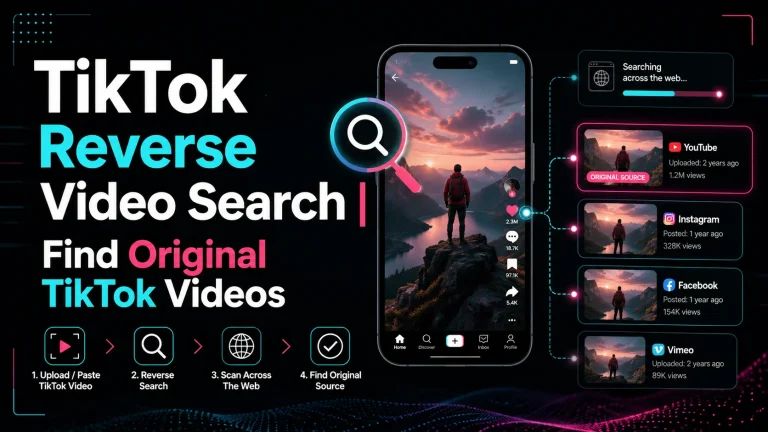
How Reverse Video Search Works | Find Original Video Sources
Learn how reverse video search works, how keyframes help find video sources, and how to search TikTok, Reels, Shorts, and viral clips online.
Search a video
Paste a video URL or upload a file. We’ll extract key frames and show likely source matches with detailed info.
What Is Reverse Video Search?
Reverse video search is a way to search the internet using a video instead of typing a keyword. A reverse video search tool works like a video source finder. It looks at the visual parts of a video and tries to find matching or similar content across public webpages, video thumbnails, indexed images, and social platforms.
Reverse video search can help you find:
- The original source of a video
- The full version of a short clip
- Reposted or duplicate videos
- Edited, cropped, or watermarked versions
- The first known upload or older appearance
- Similar videos from other websites
- Context behind viral or suspicious clips
This is helpful because many videos are shared without proper titles, captions, creator names, or source links. A video may go viral on TikTok, Instagram, YouTube Shorts, Facebook, Reddit, or X/Twitter, but the repost may not tell you where the clip actually started.
How Does Reverse Video Search Work?
Here is the simple process users follow when a tool analyzes a clip.
Reverse video search does not simply “read” the full video like a normal text search engine reads a webpage. Instead, it breaks the video into still images called frames. Then it selects the strongest and clearest frames, also known as keyframes, and compares them with visual matches found online.
Here is the simple process:
This process helps the tool search beyond titles, hashtags, captions, and file names. Even if a video has been renamed, reposted, trimmed, mirrored, or given a new caption, the visual content may still help identify it.
Why Reverse Video Search Uses Keyframes
A keyframe is a clear still image taken from an important part of a video. For example, if a clip shows a person standing near a famous building, the tool may choose a frame where the face, building, background, logo, or sign is visible.
Reverse video search uses keyframes because visual search systems work better when they compare strong images instead of every single second of a video. A long video may contain thousands of frames, but many of them may be blurry, repeated, dark, or not useful.
The best keyframes usually include:
- A clear face or object
- A logo, watermark, or sign
- A unique background
- A landmark or street view
- A product, vehicle, or building
- A scene that is not common everywhere
- Text visible inside the video
The stronger the keyframes, the better the chance of finding the original video source or similar matches online.
Reverse Video Search vs Reverse Image Search
Reverse video search and reverse image search are related, but they are not the same.
| Reverse Image Search | Reverse Video Search |
|---|---|
| Uses one image or screenshot | Uses multiple frames from a video |
| Best for photos | Best for clips, Reels, Shorts, and videos |
| Gives limited context | Uses more visual context |
| Depends on one selected image | Can analyze several useful moments |
| May miss edited videos | Can improve matching with multiple frames |
You can still take a screenshot from a video and search it with a reverse image search tool. However, reverse video search is usually better because it can analyze more than one part of the clip and may find matches that one screenshot cannot.
What Types of Videos Can Be Found?
A reverse video search tool can help with many types of public online videos, including:
For example, if you see a short video on Instagram and want to find the full version, reverse video search may help locate longer uploads or older source pages. If someone reposts your YouTube Short without credit, it may help you discover duplicate uploads across different platforms.
Why Users Trust Reverse Video Search Tools
Trust is very important when uploading or searching with a video. A reliable reverse video search tool should be clear about how it works, what type of results it can find, and what its limits are.
Users trust a reverse video search tool when it provides:
- A simple upload or URL search option
- Clear explanation of how video matching works
- Privacy-focused video processing
- No confusing or hidden steps
- Fast search for basic checks
- Deep search for difficult clips
- Helpful source links instead of vague results
- Honest limitations about private or non-indexed videos
A good tool should not promise impossible results. Reverse video search can help find public matches, similar visuals, reposts, and source clues, but it may not find private videos, deleted uploads, or clips that have never been indexed online.
This honesty builds user trust because people know what to expect before they search.
User Feedback Themes from Real Search Needs
People usually use reverse video search because they have a real problem to solve. Some want to verify a viral clip. Some want to protect their content. Others want to find the full version of a short video.
Common user feedback themes include:
| User Type | What They Usually Need | How Reverse Video Search Helps |
|---|---|---|
| Content creators | Find stolen or reposted videos | Helps locate duplicate uploads |
| Journalists | Verify viral footage | Helps check older appearances |
| Students | Find source material | Helps discover original pages |
| Marketers | Track campaign videos | Helps monitor reposts and usage |
| Social media users | Find full videos | Helps search beyond captions |
| Researchers | Check video context | Helps compare visual matches |
For USA and UK users, the biggest trust factor is accuracy plus privacy. Users want to know that the tool can search intelligently while keeping the process simple, safe, and transparent.
What Makes Reverse Video Search Results More Accurate?
Reverse video search accuracy depends on the quality and uniqueness of the video. A clear original clip usually gives better results than a blurry screen recording.
To improve your results:
- Upload the original video file when possible
- Use a clear and bright part of the video
- Avoid screen recordings with phone buttons or app icons
- Choose a scene with unique details
- Avoid intros, outros, and repeated logos
- Use a clip with faces, signs, landmarks, or objects
- Try more than one section of the video
- Use DeepSearch for edited, cropped, or reposted clips
A video showing a plain wall, dark room, or common stock footage may be harder to match. A clip with a unique location, visible text, logo, face, or object usually gives stronger results.
Why Reverse Video Search May Not Find a Match
Sometimes reverse video search may not show the result you expected. This does not always mean the tool is not working. It may mean the video is private, too new, deleted, heavily edited, or not indexed online.
| Problem | Why It Happens | What You Can Try |
|---|---|---|
| No results found | The video may be private or not indexed | Try another frame or clip |
| Wrong matches | The scene may be too common | Use a more unique moment |
| Too many results | The clip has repeated visuals | Search a clearer section |
| Poor results | The video is blurry or compressed | Upload a better quality file |
| Original source missing | The first upload may be deleted | Check older reposts |
| Edited clip not found | The video may be cropped or mirrored | Try DeepSearch or multiple frames |
Reverse video search works best with public content that has already appeared online. It may not find videos inside private accounts, closed groups, deleted pages, or newly uploaded posts that search systems have not discovered yet.
QuickSearch vs Deep Reverse Video Search
Some reverse video search tools offer both a fast search and a deeper search. QuickSearch is useful when you want a quick result or basic preview. Deep reverse video search is better when you need stronger source discovery, timeline tracing, or help with edited and reposted videos.
| Feature | QuickSearch | Deep Reverse Video Search |
|---|---|---|
| Speed | Fast | More detailed |
| Best for | Basic checks | Serious source discovery |
| Frame analysis | Limited | More complete |
| Repost detection | Basic | Stronger |
| Cropped video detection | Limited | Better |
| Timeline tracing | Simple | More advanced |
If you only want to check where a normal video appears online, QuickSearch may be enough. If you want to find the original source, full version, older upload, or repost trail of a viral clip, DeepSearch can be more useful.
Is Reverse Video Search Private?
Privacy should always be considered before uploading any video. A privacy-focused reverse video search tool should process your video only for search analysis and should not publicly publish your upload.
Still, users should be careful. Do not upload private, personal, confidential, or sensitive videos unless you have the right to use them. If a video includes private people, personal documents, children, home addresses, or confidential business information, think carefully before using any online search tool.
For best safety, use reverse video search for:
- Public social media clips
- Videos you own
- Creator content
- News clips
- Public reposts
- Product or brand videos
- Viral videos already shared online
Who Uses Reverse Video Search?
Reverse video search is useful for many people.
Content creators use it to find stolen videos and reposts. Journalists and fact-checkers use it to check whether a viral clip is old, edited, or taken out of context. Students and researchers use it to find original sources. Brands and marketers use it to monitor content usage. Everyday users use it to find full videos, original creators, or source links.
This makes reverse video search more than a simple tool. It is a source discovery, verification, research, and content protection method.
Final Tips to Find the Original Video Source
If your goal is to find the original source of a video, do not depend on only one result. Check the oldest upload date, the most complete version, the original creator name, and matching details across different websites.
Try different parts of the video. One frame may not work, but another frame may show a logo, sign, landmark, face, or object that creates a better match. If the clip is edited, cropped, mirrored, or compressed, use a deeper search option and compare multiple results.
Reverse video search works best when you combine smart technology with human checking. Review the source links, compare upload dates, and look for the version that appears most complete and original.
Conclusion
Reverse video search works by turning a video into useful keyframes, comparing those frames with indexed online visuals, and showing matching or similar source links. It helps users find original video sources, full versions, reposted videos, duplicate clips, and edited versions across platforms like TikTok, Instagram Reels, YouTube Shorts, Facebook, Reddit, and X/Twitter.
For creators, researchers, journalists, students, marketers, and everyday users, reverse video search is a smarter way to search by video instead of guessing with text keywords. When used with clear clips, strong keyframes, and careful source checking, it can help you understand where a video came from and how it has appeared online.
FAQs
Can reverse video search find the original upload date?
It may help you find older appearances or source links, but the original upload date depends on what is publicly available and indexed online.
Can reverse video search find a deleted video?
Sometimes it may find reposts, cached references, or similar versions, but it may not find the deleted original if no public copy is still available.
Can I reverse search a video from my phone?
Yes. You can use reverse video search on iPhone or Android by uploading a video clip, pasting a video URL, or using a clear screenshot from the video.
Can reverse video search identify a person in a video?
Reverse video search is designed to find visual matches and source links, not to identify private people. If the same public video appears on a webpage or profile, it may help you find related pages.
Does reverse video search work for private TikTok or Instagram videos?
Usually no. Private videos, restricted accounts, and content inside closed apps are harder to find because they may not be publicly indexed.
Is reverse video search legal to use?
Yes, reverse video search is generally legal when used for public videos, research, verification, source discovery, or content protection. Avoid uploading videos you do not own or do not have permission to use.
Discover the full potential of video reverse search technology.
Search smarter, find original sources, and explore where a video appears online.